How to easily dual box Diablo 2 Resurrected on Linux

Dual-boxing in Diablo 2 can be useful for a variety of reasons, such as rushing new characters and being able to create more of them than with a single account.
On Linux this is very easy to do with Steam and Proton, without the need to install any third-party apps or change settings in the launcher or the game.
Step by step guide
Note: Two different Battle.net accounts with Diablo 2 Resurrected are required.
-
Download the Battle.net installer.
-
On Steam in the Library section go to Add a Game
->Add a Non-Steam game->Browse->select the file Battle.net-Setup.exe->Add Selected Programs -
Right-click on the newly created entry
->Properties->we can name this however we want, such as Battle.net 1. In the Compatibility tab check Force the use of a specific Steam Play compatibility tool and choose Proton 10.xx in the dropdown below.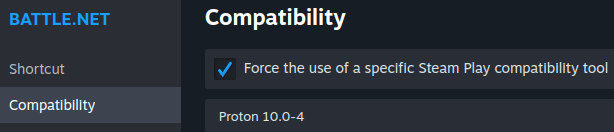
-
Right-click on the entry again
->Play. This will launch the Battle.net installer. We can accept all the default options and when it's finished the Battle.net launcher will be installed in a Wine / Proton prefix automatically created for this program. -
Go to Properties again and edit the Target and Start in fields, so that they point to the installed app's executable instead of the setup file. We can easily find the installation path of the Battle.net app by running this command in a terminal from the
homedirectory:find . -name 'Battle.net Launcher.exe' -exec readlink -f {} \; Copy the path found, paste it into the Target field, and enclose it in double quotes.
In the Start in field enter the path as well but remove the
/Battle.net Launcher.exepart and add quotes to it too.
-
Now when we click Play the Battle.net app will open and we can log in with our account and install / run Diablo 2 Resurrected.
Since Wine / Proton automatically isolate file systems and processes from each prefix, we can repeat the same steps a second time, creating another entry called Battle.net 2 and installing the Battle.net app and the game again, which will go into a different and independent prefix.
In the end we can run both entries simultaneously and log in with a different Battle.net account on each one, enabling dual-boxing without having had to tweak any settings in the game or the launcher or use third-party apps.
Here's a demo video of the finished setup: